Scenarios#
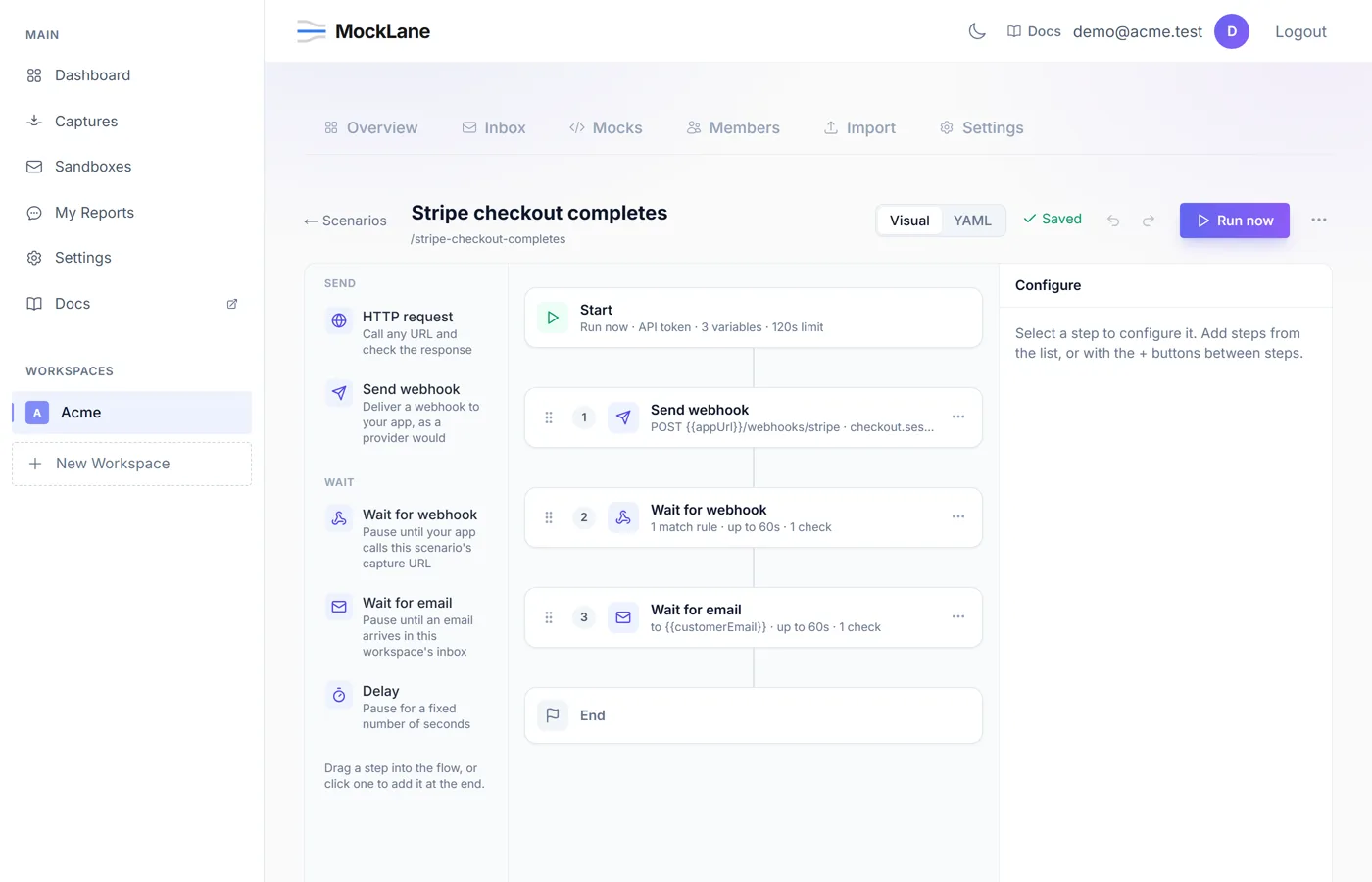
A scenario is a list of steps that run in order. Each step can use values captured by the steps before it, and any step can assert on what came back. That turns “send a webhook, check my app called us back, check the email went out” into one repeatable test instead of four manual tabs.
What URLs does a scenario get?#
When you create a scenario, MockLane provisions two addresses for it.
https://mocklane.com/s/{scenario-short-id}/...   # this scenario's mocks
https://mocklane.com/h/{capture-short-id} # where its webhooks land- The scenario URL serves mocks that belong to this scenario, overriding the workspace's. A mock defined here does not affect your normal
/m/endpoints. - The capture URL is what
wait_for_webhooklistens on. Point your application's callback at it.
What step types can a scenario use?#
Five types ship today.
{ "type": "delay", "seconds": 2 }{
"type": "http_request",
"method": "POST",
"url": "https://api.example.com/checkout",
"headers": { "Authorization": "Bearer {{apiKey}}" },
"body": { "amount": 4200 },
"capture": { "orderId": "response.body.id" },
"assert": ["status == 200", "response.body.currency == \"gbp\""]
}{
"type": "send_webhook",
"url": "https://your-app.example.com/webhooks/stripe",
"event": "payment.succeeded",
"body": { "orderId": "{{orderId}}" }
}{
"type": "wait_for_webhook",
"timeout_seconds": 30,
"match": { "body.orderId": "{{orderId}}" },
"capture": { "status": "body.status" },
"assert": ["body.status == \"confirmed\""]
}{
"type": "wait_for_email",
"to": "customer@inbox.mocklane.com",
"timeout_seconds": 60,
"assert": ["subject contains \"Payment confirmed\""]
}
send_webhook delivery, the capture is timestamped earlier than the wait began and the wait will report a timeout. Most consumers acknowledge first, so this is uncommon — but it is the flow people try first.How do I pass data between scenario steps?#
A scenario can define default variables, a run can override them, and any step can capture new ones from what it received. Reference them with {{name}} anywhere in a later step.
{
  "variables": { "baseUrl": "https://api.example.com" },
  "steps": [
    {
      "type": "http_request",
      "method": "POST",
      "url": "{{baseUrl}}/orders",
      "capture": { "orderId": "response.body.id" }
    },
    {
      "type": "http_request",
      "method": "GET",
      "url": "{{baseUrl}}/orders/{{orderId}}",
      "assert": ["status == 200"]
    }
  ]
}
How do scenario assertions work?#
Assertions decide whether a run passes. Each one is a string, and the result records what was expected and what actually arrived.
status == 200
response.body.total > 100
response.body.currency != "usd"
subject contains "Payment confirmed"
response.body.items exists
received_within 5s
Comparisons accept ==, !=, <, <=, > and >=. received_within asserts on how long the step itself took, which is the one to reach for when you care that a callback arrived promptly rather than merely eventually.
What do the run statuses mean?#
A run ends in one of five states, and two of them are deliberately not the same thing.
- passed — every step ran and every assertion held.
- failed — an assertion did not hold. This is a test result: MockLane worked correctly and told you something about your system.
- error — a step could not be executed at all. This one is on us, or on a misconfigured step.
- timeout — the run hit its overall time limit.
- cancelled — stopped before it finished.
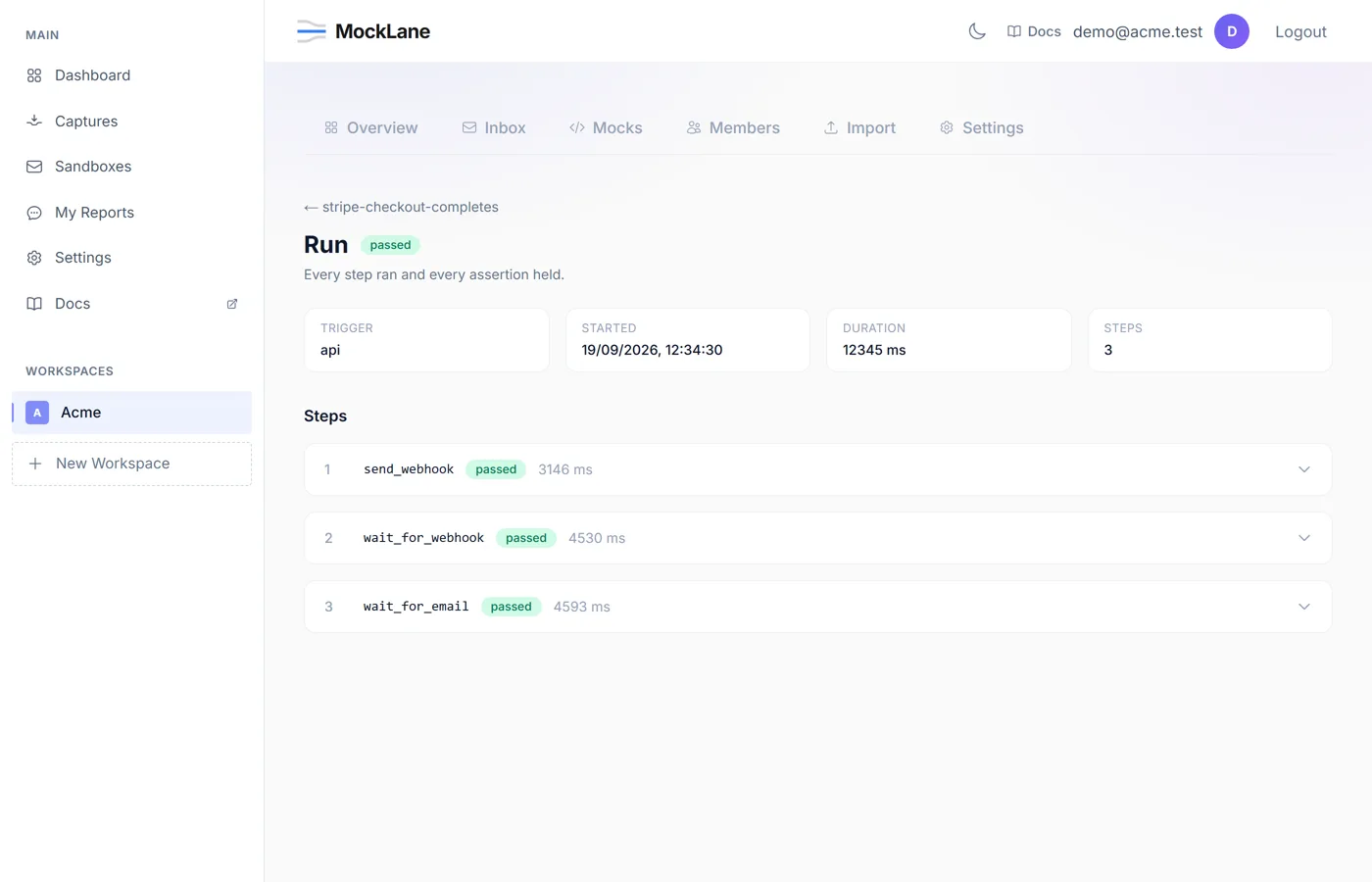
"stop_on_failure": true to a step to halt there instead.How do concurrent scenario runs behave?#
Runs execute one at a time per workspace, and different workspaces run in parallel. Serialising the workspace is what keeps wait_for_email honest: an arriving email carries nothing identifying which run provoked it, so two overlapping runs in one workspace could take each other's messages.
How do I run a scenario in CI?#
Create a workspace API token first — Settings → API tokens, or POST /api/v1/workspaces/{short_id}/tokens. The token is shown once, starts with mlt_, and is what goes in $MOCKLANE_TOKEN.
/api/v1/workspaces/{short_id}/tokens/api/v1/workspaces/{short_id}/scenarios/{slug}/run# Start a run
RUN=$(curl -sS -X POST \
https://mocklane.com/api/v1/workspaces/$WORKSPACE/scenarios/$SLUG/run \
-H "Authorization: Bearer $MOCKLANE_TOKEN" \
-H "Content-Type: application/json" \
-d '{"variables": {"baseUrl": "https://staging.example.com"}}' \
| jq -r .run_id)
# Poll until it finishes
curl -sS https://mocklane.com/api/v1/workspaces/$WORKSPACE/runs/$RUN \
-H "Authorization: Bearer $MOCKLANE_TOKEN" | jq .statusThe same thing as a GitHub Actions step:
- name: Run MockLane scenario
  env:
    MOCKLANE_TOKEN: ${{ secrets.MOCKLANE_TOKEN }}
    WORKSPACE: your-workspace-short-id
    SLUG: checkout-succeeds
  run: |
    RUN=$(curl -sS -X POST       "https://mocklane.com/api/v1/workspaces/$WORKSPACE/scenarios/$SLUG/run"       -H "Authorization: Bearer $MOCKLANE_TOKEN" | jq -r .run_id)

    for i in $(seq 1 60); do
      STATUS=$(curl -sS "https://mocklane.com/api/v1/workspaces/$WORKSPACE/runs/$RUN"         -H "Authorization: Bearer $MOCKLANE_TOKEN" | jq -r .status)
      case "$STATUS" in
        passed) echo "scenario passed"; exit 0 ;;
        failed|error|timeout) echo "scenario $STATUS"; exit 1 ;;
      esac
      sleep 2
    done
    echo "timed out waiting for the run"; exit 1
Run history for a scenario is available at GET /api/v1/workspaces/{short_id}/scenarios/{slug}/runs, and a run in progress can be stopped with POST /api/v1/workspaces/{short_id}/runs/{run_id}/cancel.
What are the scenario run limits?#
- Scenario runs count against your monthly quota: 100 on the Free plan. Paid plans with higher limits are coming soon.
- Each scenario has its own
timeout_secondsceiling, enforced across the whole run. - Outbound requests only reach public addresses. Private and link-local ranges are refused, at every redirect hop as well as the first request.
- Response bodies are captured up to 256 KB; anything larger is truncated and flagged.
wait_for_webhook.endpoint (waits always use the scenario's own capture URL), and wait_for_email matches the workspace inbox rather than a sandbox. Both return a clear error rather than doing something surprising.MockLane © 2026 · Built for developers
Go to Dashboard